djo

Drop-in interactive API docs for Django — Swagger UI, FastAPI-style, with zero decorators and zero extra dependencies.





Documentation: https://djo.readthedocs.io
Source Code: https://github.com/NEFORCEO/djo
djo turns any Django project into a self-documenting API. Add one line to INSTALLED_APPS and a full Swagger UI shows up at /docs — no urls.py edits, no serializers, no decorators on your views. It walks your project's own urlpatterns and builds the OpenAPI schema from what it finds.
The key features are:
- Zero config — the only thing you touch is
INSTALLED_APPS. Nourls.pychanges, no middleware to wire up by hand. - Automatic — paths, path parameters and HTTP methods are all inferred by walking the URLconf and the views it points to. Nothing to decorate, nothing to register.
- Typed path params —
<int:pk>,<uuid:token>,<slug:handle>are mapped to real OpenAPI types straight from Django's own path converters. - Query params —
request.GET.get("page", 1)/request.GET["tag"]style access is picked up automatically, with type and required-ness inferred from how it's read. - Smart request bodies — instead of a blank
{}, djo reads a handler's source forrequest.POST.get(...)/request.data[...]style access and pre-fills the example with the fields it actually uses. - DRF serializer aware — if a view declares
serializer_class, djo reads the real fields straight off it instead of guessing. - Auth-aware —
permission_classes,authentication_classesandLoginRequiredMixinare detected automatically and surfaced as a Swagger Authorize button. - Error responses — status codes referenced via
status=404or raised viaHttp404/DRF exceptions are added to the schema automatically. - Interactive — "Try it out" works against your real endpoints out of the box; the CSRF cookie is forwarded automatically for unsafe methods.
- No extra dependencies — pure Django. No Pydantic, no DRF required (though it plays nicely with DRF views if you have them).
Requirements
Python 3.10+, Django 5.2+.
Installation
Example
Add "djo" to INSTALLED_APPS:
That's it. Run your project as usual:
Check it
Go to http://127.0.0.1:8000/docs.
You will see the automatic interactive API documentation, generated straight from your urlpatterns — grouped by tag, with an Authorize button whenever a view needs auth:
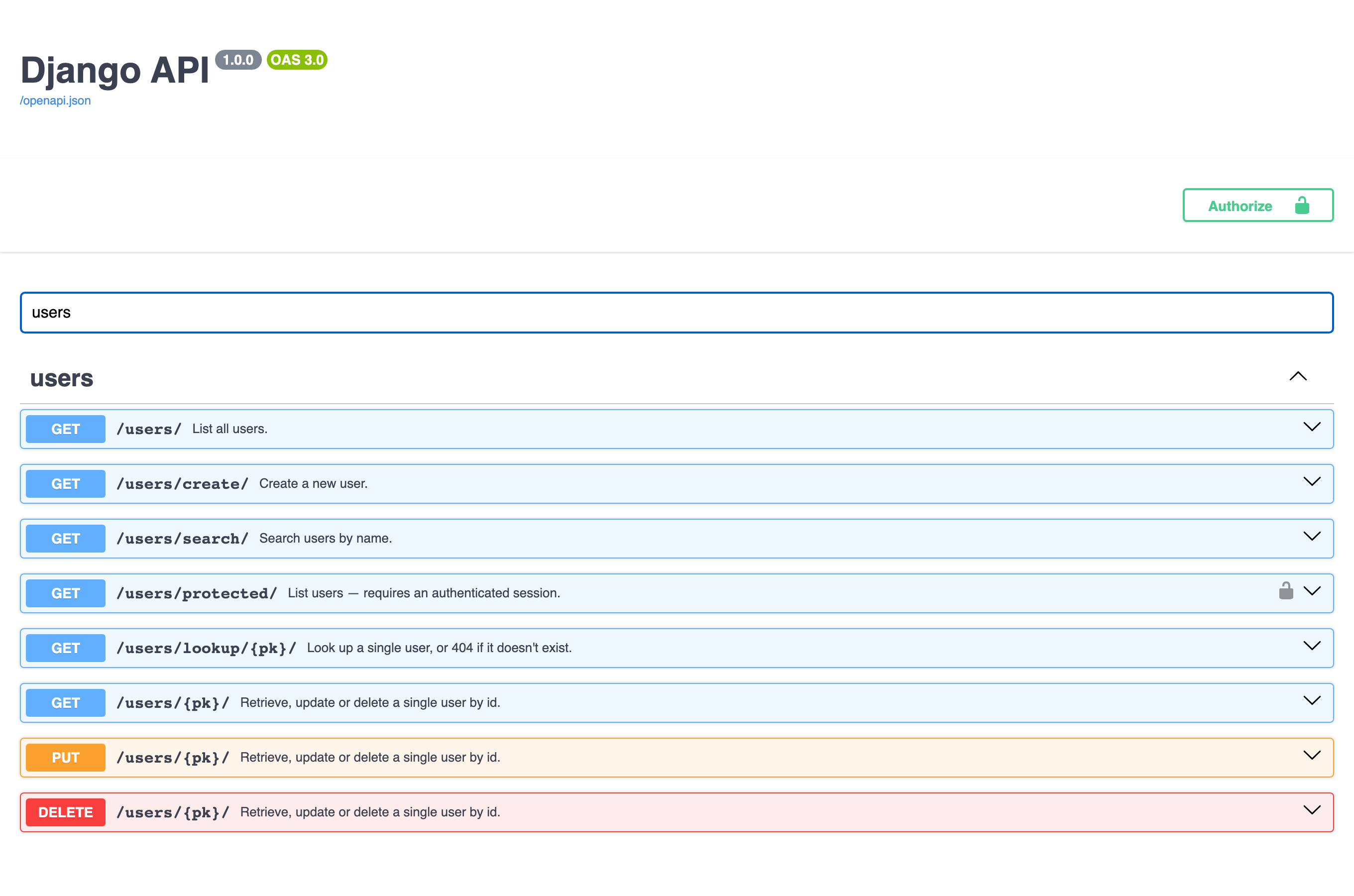
Expand any route to inspect parameters, request bodies and responses. Click Try it out to execute the request for real and see the actual response — session auth and CSRF are handled for you.
Continue to the Quick Start (Russian) for a full walkthrough, or jump straight into the Features reference.
License
This project is licensed under the terms of the MIT license.